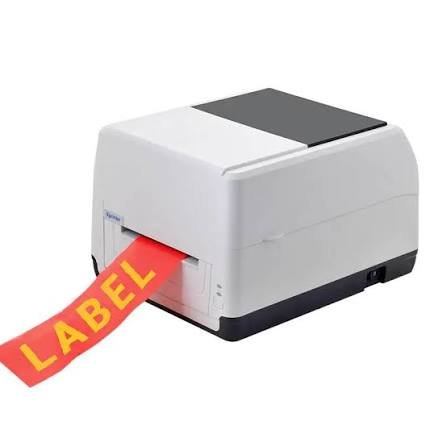
Printing speed matters when labels form part of a busy workflow. A slow device may create delays when employees need to process orders, update inventory, or print large batches of product labels.
A label printer may advertise a specific maximum printing speed, but real-world output does not always reach that number. Media type, print resolution, label size, connection method, and the complexity of the design can all influence how quickly labels come out.
What Does Label Printing Speed Mean?
Printing speed usually refers to how much label material the printer can process within a specific period. Manufacturers commonly express this measurement in inches per second, often abbreviated as IPS.
For example, a printer rated at 6 IPS has a theoretical maximum speed of six inches of media per second under suitable conditions.
The advertised figure provides a useful comparison, but it does not necessarily represent the speed you will experience during every print job.
Why Does Printing Speed Matter?
The importance of speed depends on how frequently you print. Someone producing a few labels each day may notice little difference between a slower and faster model.
A warehouse processing hundreds or thousands of labels may see a much larger impact. Faster output can help reduce waiting time and keep packing, inventory, or production processes moving.
However, speed should not become the only purchasing consideration. Print quality, media compatibility, connectivity, and reliability also affect overall productivity.
Factors That Affect Label Printing Speed
Several elements influence how quickly a printer completes a job.
Print Resolution
Higher print resolution requires the printer to create more detailed images. This can affect processing and printing speed, particularly when labels contain small text, graphics, or complex barcodes.
For simple shipping labels, standard resolution may provide enough detail. Applications that require very small or precise information may benefit from higher resolution even when it reduces maximum speed.
Label Size
Larger labels naturally require more media to pass through the printer. A small product label may finish quickly, while a larger shipping or pallet label takes longer.
The number of labels alone does not tell you how long a job will take. Total media length provides a better indication of the actual printing workload.
Print Density
A label containing a simple barcode and a few lines of text requires less processing than one covered with graphics and dense information.
Heavy print coverage may affect how quickly the printer can maintain consistent output. The printer may also automatically adjust settings to maintain print quality.
Printing Technology
Different printing technologies have different performance characteristics. Direct thermal and thermal transfer printers both use heat, but thermal transfer systems also work with ribbons.
The printer’s mechanical design, printhead, processor, and media handling system all contribute to its rated speed.
Connection Method
The connection between the computer and printer can also influence workflow efficiency. USB, Ethernet, Wi-Fi, and Bluetooth have different characteristics.
A network printer serving multiple computers may experience delays when several users send jobs simultaneously. The printer itself may have a high maximum speed, but queued jobs can still increase overall waiting time.
Maximum Speed vs. Real-World Speed
A manufacturer’s maximum speed usually represents performance under specific test conditions. Your actual output may differ because of the media, print settings, label design, and connected software.
For example, a printer may reach its rated speed when producing simple labels with suitable media. A complex label with high-density graphics may require more processing time.
When comparing models, treat the maximum speed as a reference rather than a guarantee of the exact output you will receive.
How Label Length Affects Production Time
Label length has a direct relationship with total media consumption. A printer producing short labels can process more individual labels within the same amount of time than one producing long labels.
Consider two print jobs that contain the same number of labels. The job with shorter labels may finish sooner because the printer has less media to move.
For high-volume operations, calculate expected media usage rather than comparing label counts alone.
Does the Label Material Affect Speed?
Yes. Different media types can have different thicknesses, coatings, and handling requirements. The printer may need to adjust its settings according to the material.
Thermal transfer printing also involves a ribbon that moves through the printer with the label media. The printer must coordinate both materials during the printing process.
Always use media that matches the printer’s specifications to avoid feeding problems and inconsistent performance.
Also, explore Maintenance Tips to Extend the Life of Your Xprinter Thermal Receipt
How Software Can Affect Printing Speed
The printer may receive data from label-design software, shipping platforms, inventory systems, or point-of-sale applications.
A complicated design or inefficient data transmission can add processing time before the physical printing starts.
Using appropriate drivers and properly configured software can help reduce unnecessary delays. Keeping templates simple can also improve workflow efficiency when you print large quantities.
Batch Printing vs. Individual Labels
Sending labels as a batch can sometimes create a smoother workflow than sending each label as a separate print command.
For example, an online store processing many orders may send a complete group of shipping labels to the printer. The printer can then work through the queue without waiting for repeated individual commands.
The exact benefit depends on the software and network configuration.
How to Choose the Right Printing Speed
Start with your actual workload instead of automatically selecting the fastest available printer.
Consider:
- Average labels printed per day
- Peak printing volume
- Average label length
- Required print resolution
- Label design complexity
- Printing technology
- Connection method
- Available workspace
A small business printing a few dozen simple labels may not need an industrial high-speed device. A distribution center with continuous printing requirements may benefit from a model designed for higher workloads.
Ways to Improve Printing Efficiency
You can often improve overall output without replacing the printer.
Use compatible media, keep the printhead and rollers clean, and make sure the printer uses appropriate settings for the label material.
You can also optimize label designs by removing unnecessary graphics and selecting a suitable resolution. A stable connection and properly configured software can further reduce delays between print jobs.
Final Thoughts
Label printing speed depends on more than the maximum IPS rating listed in a printer’s specifications. Label size, resolution, print density, media type, software, and connection method can all influence real-world performance.
The best printing speed depends on your workload. Focus on the number and type of labels you actually produce, then choose a printer that provides enough speed without sacrificing the print quality, compatibility, and reliability your workflow requires.